 Agetor
What is Agetor?
Agetor is a local-first kanban control plane for running CLI coding-agent harnesses in parallel. It keeps each task isolated in its own git worktree and shows approvals, follow-ups, transcripts, and run state in one desktop app.

Run multiple CLI coding agents. On every repo. At once.
A harness is the runtime that drives a coding agent — the loop, tool dispatch, and context around the model. Claude Code is a harness; Codex and more are coming soon. Agetor is the kanban control plane that runs them in parallel — including multiple aliases of the same harness, each with its own account or binary — isolates every task in its own git worktree, and surfaces approvals and clarifying questions as structured cards.
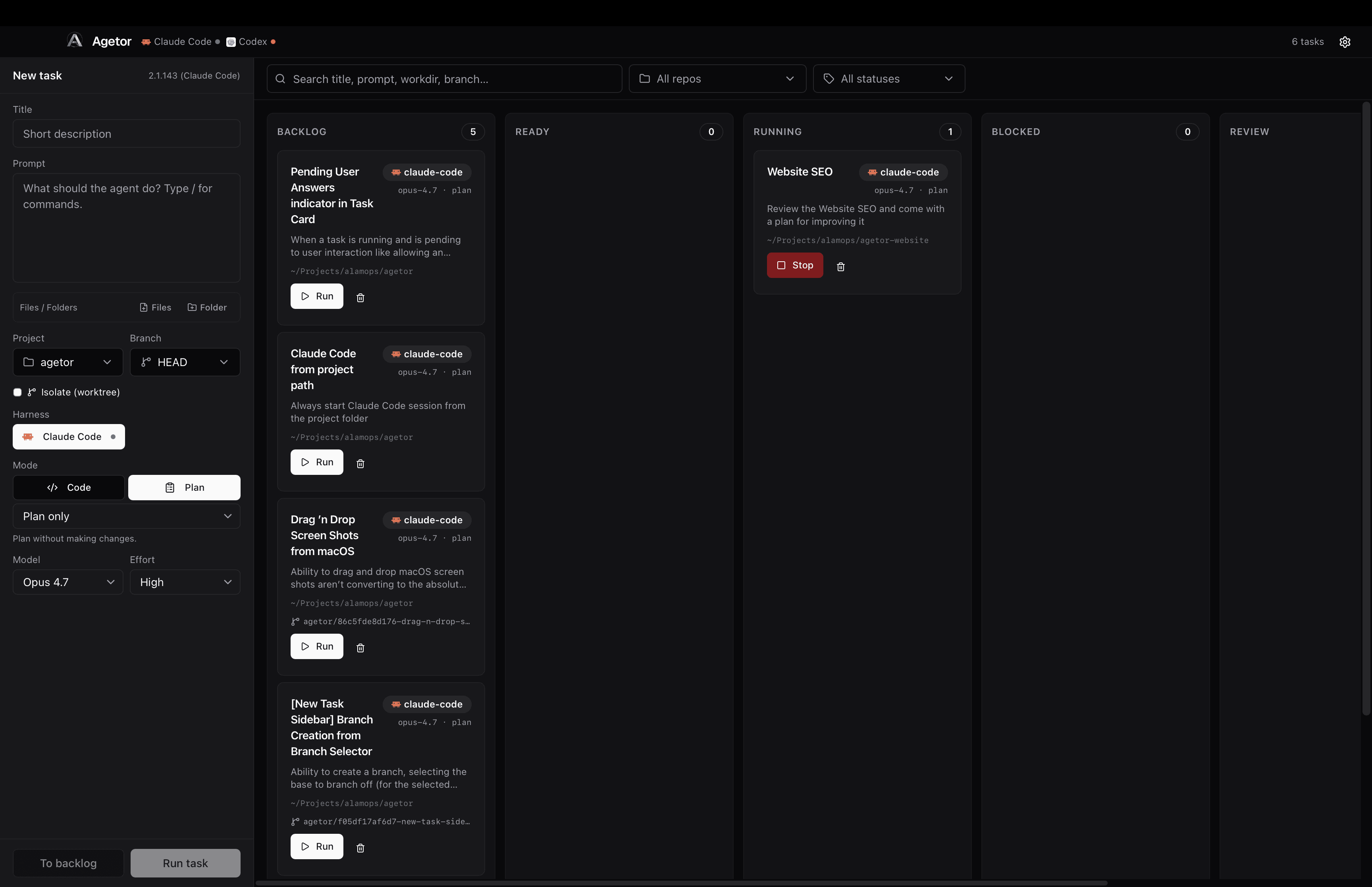
Everything you need to coordinate multiple coding agents at once — without juggling shells, branches, and accounts by hand.
claude -p, no Agent SDK.Agetor drives Claude through its interactive REPL — the same path you take when running the CLI by hand. We don't call claude -p (print mode) and we don't use the Claude Agent SDK. How that gets billed depends on Anthropic's current terms; we just stay on the path you'd take yourself.
Three steps. No setup wizard, no cloud relay.
Choose any local folder and any harness — built-in or one you defined. Write a prompt. If the folder is a git repo, you get worktree isolation for free.
A dedicated branch and worktree get created off your base. The harness runs there in its own environment, with the right execution model for the agent it wraps. Output streams back live as it's produced.
Tool approvals and clarifying questions surface as structured cards in the run panel. Send follow-up turns without losing the conversation. Re-run any task to a clean base state.
Agetor doesn't replace your agents — it runs them. No proprietary model, no SDK lock-in, no guard-rails on top of the ones the agents already have.
Everything — tasks, runs, transcripts, approvals — lives on your machine under ~/.agetor. No relay, no telemetry, no account.
Per-task git worktrees and per-harness $HOME keep parallel runs from interfering with each other. Agents act with your shell privileges — the same as running the CLI yourself — so what you trust stays consistent end to end.
Built on the tools you already use — git, your shell, your editor. Add a new harness kind by extending two files; no plugins, no SDK lock-in.
Run as many tasks as you want in parallel — across multiple repos and multiple harnesses. Each one is independently cancellable, resumable, and inspectable.
Download the app for macOS, drive it from the terminal, or build it from source yourself.
One-click install. The signed .dmg has everything bundled — no build tools required.
For Apple Silicon
Drives the same board from your shell, with or without the desktop app open.
Apple Silicon (arm64) macOS only, same requirements as the app.
For Linux, custom forks, or if you just prefer it. Requires Bun, git, tmux, and at least one harness CLI on your PATH.
Don't have a harness yet? npm i -g @anthropic-ai/claude-code. Codex and more harnesses are coming soon.
Practical details about local execution, supported harnesses, git worktrees, and source access.
Agetor is a local-first kanban control plane for running CLI coding-agent harnesses in parallel. It keeps each task isolated in its own git worktree and shows approvals, follow-ups, transcripts, and run state in one desktop app.
Agetor runs Claude Code today through its interactive CLI. Codex and additional harnesses are planned, and the app is designed so multiple harness aliases can run side-by-side with separate homes, accounts, binaries, and environment settings.
No. Agetor runs locally on your Mac and stores tasks, runs, transcripts, approvals, and harness configuration under ~/.agetor. The agents still run with the same privileges and network behavior they have when you launch their CLIs yourself.
When a target folder is a git repo, Agetor creates a dedicated branch and worktree for each task from a pinned base ref. That lets multiple agents work against the same repository without sharing the same checkout.
Yes. Agetor is open source and can be cloned from GitHub. You can also download the macOS Apple Silicon build if you want the fastest setup path.
Yes. Agetor also ships an experimental terminal CLI for Apple Silicon Macs that drives the same board from your shell, installed via a curl script from GitHub Releases. The desktop app isn't required to use it.
Clone the orchestrator, point it at a folder, and ship something useful before your coffee's cold.